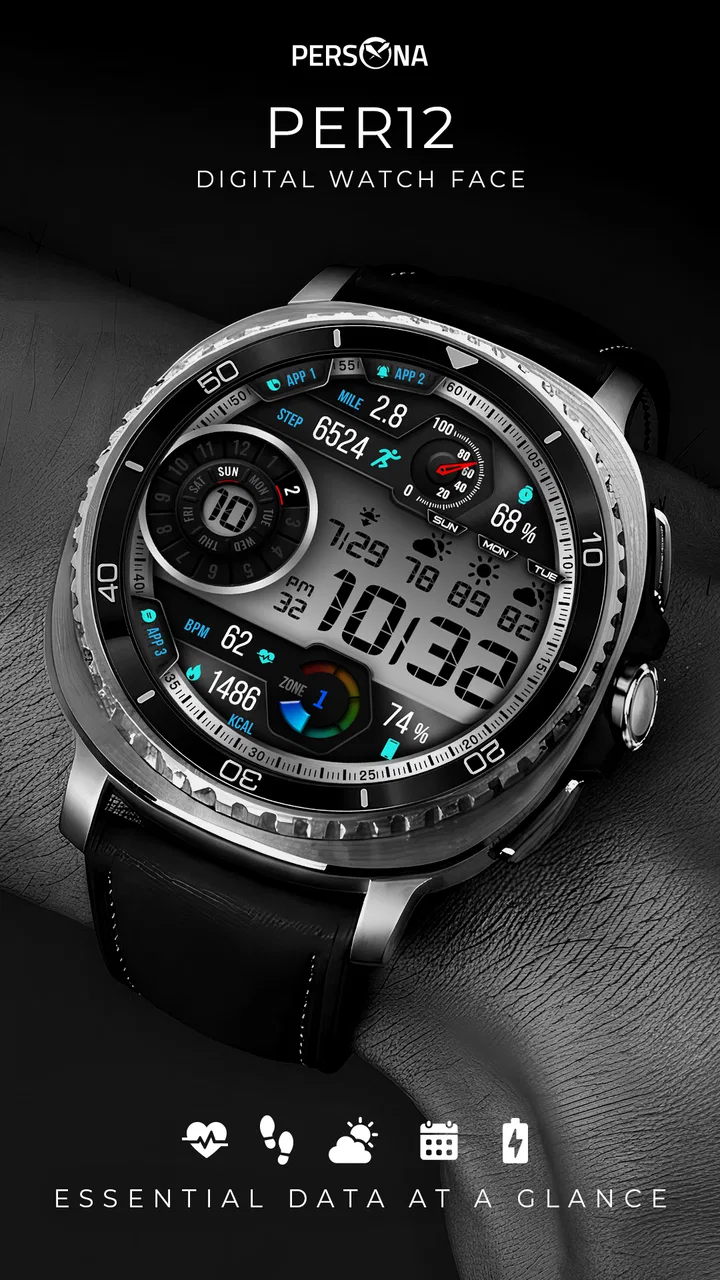
PER12 Digital Watch Face
- 3.6
- Rating
- 10.00K
- Installs
- $1.99
- Price
 Analysis by App-foxy
PER12 Digital Watch Face is the kind of personalization app I appreciate when I want my smartwatch to behave more like a quick information panel than a decorative accessory. Its main appeal is a clean digital layout that brings everyday details such as steps, heart rate, battery status, and the date into one glance. I tested it with that practical purpose in mind: not as a flashy design experiment, but as a watch face I could read while walking, working, or checking the time without opening another screen.
The strongest idea here is information density without visual clutter. That sounds simple, but it changes how useful a watch becomes during a normal day. Instead of choosing between a minimal face that tells me almost nothing and a crowded design that takes effort to decode, this face aims for a middle ground. It belongs to the personalization category, and PERSONA Watch Face has focused the design on readable digital information rather than elaborate decoration.
That focus will not suit everyone. If your priority is a highly artistic face, animated visuals, or a large collection of radically different styles, this is probably too restrained. If you want a practical face that lets you check several routine indicators in one glance, however, it makes a sensible case. The app costs $1.99, carries an Everyone age rating, and has reached over 10 thousand installs. Its average rating is 3.6 from over 200 ratings, which suggests a useful but not universally satisfying experience.
You May Also Like

 Blood Strike: 2.5 Anniversary
Blood Strike’s Loadouts Turn Every Drop Into a Tactical Gamble
A close look at Blood Strike’s custom loadouts: how fast access to signature weapons reshapes its battle royale rhythm, rewards preparation, and narrows the gap between fights.

 Pandora - Music & Podcasts
Pandora’s Music Is Easy to Start, but Harder to Recover
Pandora’s strength is its low-effort path from a seed to a station. Its weak spot is how much confidence it asks you to place in connection, setup, and quiet recovery.

 8 Ball Pool
 Is Built on Rivalries, Rematches, and Routine
A close look at the rivalries, rematches, shared routines, and unanswered safety questions that turn a quick pool match into a persistent mobile community.

 Samsung Music
’s Quiet Strength Is Playing What You Already Own
Its reach comes less from spectacle than from dependable access to a personal library. That simplicity is both the app’s strongest retention engine and its ceiling.

 AccuWeather: Weather Radar
AccuWeather Review: A Quick, Clear Forecast for Everyday Decisions
For everyday plans, the best forecast is the one you can understand quickly. AccuWeather makes rain timing, radar, and local conditions easy to act on, with a few trade-offs.

 Hill Climb Racing
Why Hill Climb Racing Still Turns Crashes Into One More Run
A tiny car, a bumpy hill and one more upgrade: Hill Climb Racing keeps resurfacing because its simple chaos makes every near-miss feel personal.
More From Our News Desk
View All News


One glance that replaces several small checks
I find the most useful way to judge this face is to notice which small checks it removes from my routine, rather than expecting it to replace a phone or health app. Putting time, date, battery, steps, and heart rate together can make a glance more decisive, especially when I am already moving. The next section looks at how those details fit into the changing pace of an ordinary day.
The capability that matters most
The central capability is not any single complication. It is the way the face combines steps, heart rate, battery, date, and time in a single digital presentation. On a smartwatch, that combination can save small amounts of effort repeatedly. I can look down to see whether I am close to my walking goal, whether the watch needs charging later, or what day it is, without moving through a menu.
That matters most when the watch is being used as a quiet utility. During a walk, I do not want to stop and navigate through health screens just to check progress. At work, I may want the time and battery level without waking a more elaborate interface. At the end of the day, the date is useful when I am arranging appointments or checking whether a reminder belongs to today. The face turns those tiny questions into a glance rather than a task.
I also like the fact that the design is digital. Digital numerals are generally quicker for me to interpret than a detailed analog layout when I am in a hurry. That does not make the face automatically better for everybody, but it gives it a clear identity. The design is aimed at people who value immediate reading over atmosphere.
Why the arrangement affects daily usefulness
A watch face can technically include many details and still fail in practice if the eye has to search for them. PER12 Digital Watch Face works best when I treat it as a dashboard: time first, then the small indicators around it. The benefit is not that it displays information I could never find elsewhere. The benefit is reducing the number of actions between noticing a question and getting an answer.
That distinction is important when comparing it with the usual alternatives. A minimalist digital face may look cleaner, but it often forces me to open a widget or another screen for steps or heart rate. A decorative analog face may be more expressive, yet its small complications can be slower to read. A dense fitness-oriented face may expose more exercise information, but can feel excessive when I only want routine awareness. This design sits between those choices.
The real gain is fewer interruptions, not more data. I would not choose it because it transforms the watch into a serious training instrument. I would choose it because the information I already care about is visible at the moment I glance at my wrist.
What I would check before installing
The short description identifies it as PER12 Digital Watch Face, while the longer store summary highlights steps, heart rate, battery, date, and other details. That gives a clear idea of its purpose, but I would still approach installation with realistic expectations. A watch face is dependent on the watch platform and the way the device supplies health and battery information. The face can present those indicators, but it should not be treated as a replacement for a dedicated health app or a medical device.
For someone deciding whether to pay, the important question is not whether the face contains enough labels. It is whether those labels match the information you actually check. If I rarely look at steps or heart rate, the layout may feel busier than necessary. If I check battery and activity several times a day, the $1.99 purchase is easier to justify because the convenience is repeated rather than occasional.
How it works during an ordinary day
The face is most helpful when my attention is divided: I can check the time and battery before heading out, then glance at steps during a walk without turning the moment into a separate fitness session. I would treat the heart-rate figure as a quick reference, not a verdict, and use fuller health tools when the detail matters. That distinction leads to the routine where this compact layout feels most at home.
Morning: battery and date before leaving
My most practical use starts in the morning. Before leaving home, I can check the time, date, and battery together. That combination helps me decide whether the watch is ready for the day or whether it should spend a few minutes on the charger. A face that hides battery information behind a swipe creates a small inconvenience at exactly the point when I am already rushing.
The date is also more useful than it sounds. When the watch is used for work, school, appointments, or travel, the date becomes a frequent confirmation rather than a decoration. Having it on the same surface as the time makes the face feel more complete. I do not need to open a calendar for a simple day check.
Walking: progress without turning the watch into a coach
On a walk, the steps indicator is the feature I notice most. It gives me a passive sense of progress without requiring a workout session or a separate fitness screen. I can glance down and decide whether to take a longer route, keep walking for a little while, or simply stop because I have reached the amount of movement I wanted.
This is where the face has a subtle advantage over a purely decorative alternative. It encourages awareness without constantly demanding attention. I would not use it to analyze pace, intervals, or a detailed training plan, but that is not a weakness if your goal is simply to stay aware of movement. For everyday activity, a visible step count can be enough to change a decision.
There is also a useful trade-off here. Showing steps on the main face can motivate me, but it can also make the watch feel more like a tracker. Someone who wants their wrist to look calm and uncluttered may prefer to hide all health-related information. This is a personalization choice, not a universal improvement.
During work: fast reading with less interaction
At a desk, the face is useful in a different way. I can check the time during a meeting or while working without opening an app. The digital presentation is especially appropriate when I only have a second to look. I do not have to interpret hands or search for small symbols before returning my attention to the task.
The battery indicator also becomes valuable during long work periods. Rather than discovering late in the day that the watch is nearly empty, I can notice its condition during ordinary time checks. That is a small workflow improvement, but it is one of the reasons I prefer informative faces over purely visual ones.
Heart rate: useful context, not a diagnosis
The heart-rate display adds context to the rest of the layout. I can use it as a quick indication of what the watch is reporting at that moment, especially after moving around or during a quiet break. I would treat it as an awareness tool rather than a precise health conclusion. A number on a watch face is easy to misread as authoritative, so I would avoid making medical decisions from it.
This is also a reason not to overvalue the presence of a heart-rate field when comparing watch faces. If you need detailed trends, history, alerts, or structured exercise analysis, a dedicated health or fitness interface is the better place to work. The advantage here is immediate visibility, not depth.
Evening: deciding whether the watch is ready for tomorrow
At night, the battery display becomes the most actionable part of the face. I can make a quick charging decision without opening settings. If the watch is still comfortable for the next day, I can leave it alone; if not, I know before going to bed. This is a modest feature, but it prevents the familiar annoyance of starting a day with a dead wearable.
The same glance can also show whether the day’s step total looks reasonable to me. I do not need to turn the watch into a report. The face is better when it remains a quick endpoint for simple decisions rather than becoming a substitute for the full companion software.
The best scenario for this watch face
For me, the strongest fit is a day with several transitions—commuting, desk work, and a walk—when I want the same few indicators available without repeatedly opening menus. A useful habit is to decide in advance which fields actually influence a choice, such as whether to charge the watch or continue walking. The next section considers what that convenience asks in return.
A practical smartwatch for a busy routine
The strongest scenario is a person who wears a smartwatch throughout the day and repeatedly checks a small group of basics: time, date, battery, steps, and heart rate. Imagine leaving for work, walking from a station, sitting through meetings, and heading home. In that routine, the face gives useful context at each stage without requiring a different screen for every question.
It is particularly well matched to someone who wants gentle activity awareness rather than an aggressive fitness interface. You can see whether you have been moving, but the design does not need to dominate your day with training information. For me, that balance makes sense when I want the watch to support habits without making every glance feel like a performance review.
Another good scenario is a user who changes watch faces often but keeps returning to practical layouts. Decorative faces can be enjoyable for special occasions, yet they are not always the best daily choice. This one is easier to live with because its value comes from repeated utility. Once the arrangement becomes familiar, reading it should require very little thought.
Who may find the layout less comfortable
I would be cautious if you have poor eyesight or prefer unusually large numerals. The more information a face places around the main time display, the more important spacing and contrast become. A clean layout helps, but “clean” does not necessarily mean every element will be comfortable for every wearer. Before paying, I would look closely at the screenshots on the store page and compare them with the physical size of your watch.
I would also skip it if your main goal is visual variety. This is a focused product from PERSONA Watch Face, not a complete design library. People who enjoy matching a face to clothing, seasons, sports teams, or changing moods may get more value from a broader collection. The $1.99 price is reasonable for a single practical face, but less attractive if you expect a large catalog inside one purchase.
Trade-offs that become clear after daily use
The trade-off I would watch for is not a complicated setup but whether the information remains comfortable to read on my own wrist. A layout that feels clear in a product image can feel crowded at a quick glance, particularly if I prefer a bare display or larger time numerals. That makes personal reading comfort more important than the number of fields, and it helps identify who is likely to appreciate the design.
More information means more visual responsibility
The main trade-off is straightforward: every extra indicator can save a tap, but every extra indicator also competes for attention. The face succeeds when the layout remains readable at a glance. It is less convincing for users who believe a watch should show only the time. I would not call that a flaw in the design; it is a direct consequence of choosing an information-first face.
My advice is to judge it from your actual wrist distance, not from a large phone screenshot. A face can look spacious on a store page and feel compact when viewed quickly while walking. Check whether you can identify the time immediately, then see whether the secondary fields remain understandable without staring. That test tells you more than the feature list.
Convenience versus specialized depth
Steps and heart rate are helpful because they are visible, but visibility is not the same as analysis. If you are a serious runner, cyclist, or athlete, you will likely want a dedicated workout screen with richer context. A specialized fitness face may be a better option if training metrics are the reason you wear the watch.
On the other hand, a specialized face can be unnecessary for someone who only wants a daily snapshot. In that case, PER12 Digital Watch Face avoids the opposite problem: it does not ask me to interpret a full training dashboard every time I check the time. The right choice depends on whether your watch is primarily a health tool or a convenient everyday companion.
What the rating tells me about expectations
The app has an average rating of 3.6, with over 200 ratings and 34 written reviews. I read that as a reason to set expectations carefully rather than as an automatic rejection. The concept is clear and useful, but watch-face satisfaction is highly personal. Screen size, readability preferences, platform behavior, and the importance of each displayed field can change the experience considerably.
The app was released on June 12, 2022, and its audience has grown beyond 10 thousand installs. That gives it a meaningful user base for a focused watch-face product, though I would still make the purchase based on the design itself. A practical face has to fit your wrist and habits; popularity cannot solve a layout mismatch.
Price and purchase decision
At $1.99, I view it as a small paid customization rather than a major commitment. The price makes sense if the face becomes your daily default and replaces repeated taps. It makes less sense if you are only curious about the design or tend to change faces every few days.
I would make the decision using a simple rule: count the information fields you genuinely check. If battery, date, steps, and heart rate all matter, the face is doing several jobs at once. If only the time matters, a simpler free alternative may be a better fit. Paying for convenience is worthwhile only when the convenience appears often enough to be felt.
Who gains the most from this design
I think this design gives the most to someone who repeatedly checks a handful of everyday details and values speed over visual variety. It is less compelling if the watch is mainly a style accessory, or if training analysis is the main reason for wearing it. With that distinction in mind, the closing section weighs whether the face’s focused approach is a good match for different habits.
The best match
I recommend it most to smartwatch owners who want a dependable daily dashboard. You gain the most if you prefer digital time, want steps and heart rate visible, regularly monitor battery, and appreciate having the date nearby. The face is also a good match for people who dislike navigating through multiple widgets for basic information.
It should appeal to someone who wants a calm, functional watch rather than a watch that constantly announces its personality. The design’s strength is repetition: the more often you glance at your wrist, the more useful the arrangement can become. That is different from a face whose value comes mainly from looking impressive once.
Who should choose something else
I would point elsewhere if you want extensive customization, expressive artwork, or a specialized sports dashboard. I would also suggest a simpler minimal face if the presence of steps and heart rate makes your watch feel too busy. For people who need medical-grade interpretation or detailed fitness analysis, the watch’s full health tools are more appropriate than any compact face.
There is no benefit in forcing a practical layout onto a wearer who does not want practical information. Personalization works only when the screen reflects how you actually use the device. This face is specific and purposeful, so its limitations are easy to understand: it prioritizes a compact set of everyday indicators instead of trying to satisfy every style and fitness preference.
My final recommendation
After using it as an everyday information surface, I see PER12 Digital Watch Face as a sensible paid choice for utility-focused smartwatch users. Its best feature is the way it turns several routine checks into one glance. That can make a real difference during walks, workdays, commutes, and charging decisions, even though none of those individual details is revolutionary.
I would recommend checking the visual scale on your own watch and being honest about how much information you want at once. If the layout feels readable and those indicators match your routine, the price is easy to defend. If you want art, variety, or advanced training data, another option will serve you better. For my use, the face earns its place by staying focused: it makes the smartwatch more useful without pretending to replace the tools behind it.
FAQs for PER12 Digital Watch Face
01What is PER12 Digital Watch Face?
PER12 Digital Watch Face is a customizable digital watch face designed for compatible Wear OS smartwatches. It focuses on a clean, information-rich layout, typically displaying the time alongside useful details such as the date, battery level, and other watch data. Its appearance may vary depending on the device, Wear OS version, and the customization options supported by the developer.
02Which smartwatches are compatible with PER12 Digital Watch Face?
Compatibility depends on the version listed in the Google Play Store and the operating system installed on your watch. PER12 Digital Watch Face is intended for supported Wear OS devices, but not every smartwatch model may be compatible. Before downloading, check the store listing for the required Wear OS version and supported devices, especially if you use an older watch or a model with a customized operating system.
03Can I customize the PER12 Digital Watch Face?
The available customization depends on the edition and the features enabled by the developer. Users should generally review the watch-face settings after installation to see whether they can adjust colors, complications, time format, or displayed information. Some options may only appear on the watch itself or through a companion configuration screen, so the exact level of personalization can differ between devices.
04Does PER12 Digital Watch Face affect battery life?
Like any active watch face, PER12 Digital Watch Face may have some effect on battery consumption, although the impact is usually influenced more by the watch hardware, screen technology, brightness, complications, and update frequency. A simpler configuration with fewer frequently updated data fields may help reduce battery use. If battery life becomes noticeably shorter, try disabling unnecessary complications or ambient-display options.
05How do I install and use PER12 Digital Watch Face?
Install PER12 Digital Watch Face through the compatible Google Play Store listing while your smartwatch is connected to your phone and signed in with the appropriate account. After installation, open the watch-face selector on the smartwatch, find PER12, and apply it. If it does not appear immediately, check the watch’s installed apps, confirm compatibility, and allow a short period for synchronization between the phone and watch.
Pros
- Clean
- modern design suits both casual and formal outfits.
- Displays useful information such as time
- date
- battery
- and weather.
- Multiple color and layout options allow easy personalization.
- Optimized for Wear OS with a clear
- readable interface.
- Low-distraction style keeps the watch face easy to glance at.
Cons
- Some customization options may require an in-app purchase.
- Weather information depends on location permissions and phone connectivity.
- Small text can be difficult to read on watches with compact screens.
- Advanced settings may take time to discover and configure.
- Compatibility is limited to supported Wear OS smartwatches.

PER12 Digital Watch Face
Gallery